Here's a clear, professional, and user-friendly version of your update instructions with improved structure and clarity:
🔧 How to Update Your Digital Key Using the Bring & T Update App
Keep your digital key secure and up to date by following these simple steps. This update ensures compatibility, enhanced security, and improved performance.
✅ Step-by-Step Update Guide:
-
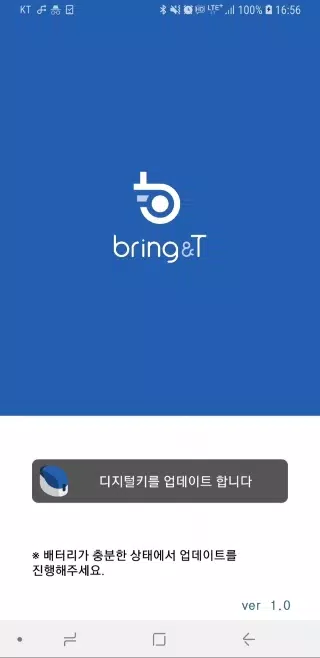
Launch the BringAnti Update App
Open the Bring & T Update application on your smartphone or tablet. -
Tap "Update Digital Key"
Locate and tap the "Update Digital Key" button at the bottom of the screen. -
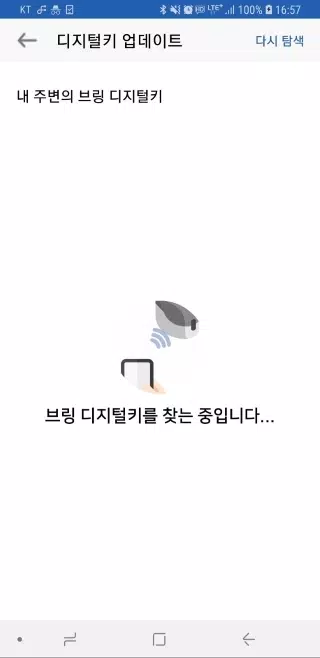
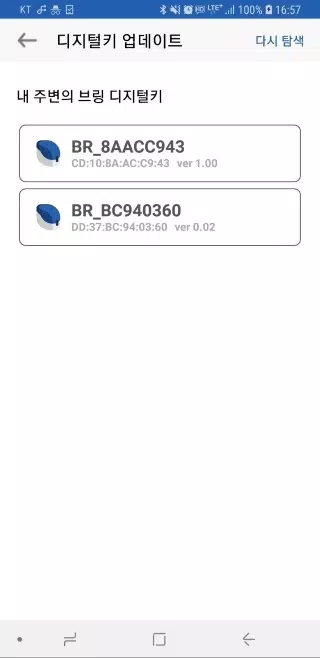
Select Your Digital Key
Choose your key from the list (e.g.,BR_xxxxxxxx).
If your key does not appear:- Tap [Search Again] to refresh the device scan.
- Ensure your phone is within 1 meter (3 feet) of the digital key.
-
Check Available Updates
The app will display your current firmware version and any available updates. -
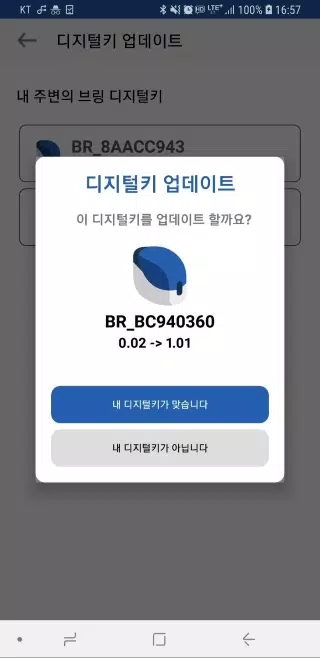
Confirm Device & Begin Update
- Tap "Your device is correct" to proceed.
- The digital key’s LED will blink purple for 10 seconds to confirm connection.
-
Press the Button Briefly
- Press and release the digital key’s button for 0.5 seconds to initiate the update.
-
Wait for Completion
- The LED will turn blue when the update is successfully complete.
-
Exit the App
Tap "Close" to exit the application.
⚠️ Important Update Tips:
- Stay Close: Keep your mobile device within 1 meter (3 ft) of the digital key during the update.
- No Interruptions: The process takes 2–3 minutes. Do not close the app or turn off your phone.
- Battery Check: Ensure your mobile device has at least 50% battery before starting.
- Troubleshooting:
- If an error occurs, restart the app and try again.
- If the key still doesn’t appear, restart your phone and relaunch the app.
- Registration Required: Only registered digital keys can receive software updates. Unregistered keys will not appear in the list.
✅ You're All Set!
Once the LED turns blue, your digital key is successfully updated and ready to use.
For help, contact Bring Support: [email protected]
Let me know if you'd like this exported as a PDF, embedded in a website, or translated into another language!

브링앤티 업데이트 のスクリーンショット


トップダウンロード
もっと >-

- Anycubic
- 4.3
-
-
- EVA AIR
- 4.5
-
-
-
- Mp3 Juice
- 4.4
-

- FiiO Control
- 4.2
-

- Grammar Checker
- 4.1
-

-

トレンドのアプリ
-
-
- Perhitungan Had Kifayah
- 4.0 通信
- PerhitunganにはKifayah:Zakatの適格性の決定に革命をもたらす画期的なアプリがありました。この革新的なツールは、社会経済的要因とローカルコンテキストを考慮して、Zakatの受信者(Mustahik)としての資格の最小しきい値(Kifayahを持っていた)を計算します。評価には7つが含まれます
-
-
- Internet Download Manager (IDM)
- 4.5 ツール
- Internet Download Manager (IDM) を使用して Android のダウンロードを促進しましょう!この強力なダウンロード マネージャーは、マルチスレッド テクノロジを使用してダウンロード速度を最大 500% 高速化します。 中断されたダウンロードを簡単に再開し、直接ダウンロードやダウンロードを含むさまざまなファイル タイプのシームレスなサポートをお楽しみください。
-
- VPN - Unblock Proxy Hotspot
- 4.5 ツール
- 安全でプライベートなブラウジングを実現する最高の Android VPN アプリである VPN - Unblock Proxy Hotspot を使用して、インターネットのロックを解除します。 この直感的なアプリは、スマートフォンやタブレット上で高速の暗号化された VPN 接続を確立し、場所に関係なくお気に入りの Web サイトやアプリへのアクセスを許可します。 バイパスg
-
Latest APP
-
-

- Карта Стрелка
- 3.7 自動車と乗り物
- 「Arrow」交通カードにチャージする 「Arrow Map」アプリを使用すると、モスクワ地域での公共交通料金の支払いに使用される「Arrow」交通カードを簡単に補充できます。 クレジットカードでチャージする場合、取引手数料がかかることにご注意ください。 アプリ内で「Arrow」カード番号とクレジットカードの詳細を入力するだけで、残高は数秒以内に更新され、混雑時の支払い端末の検索や待ち時間を省略できます。 現在のカード残高を確認したり、乗車記録やチャージを含むすべての取引履歴を閲覧することもでき
-
- بيورلي - Purely
- 4.8 自動車と乗り物
- サウジアラビアのPurelyモバイルカーウォッシュアプリ サウジアラビアでPurelyモバイルカーウォッシュアプリケーションを体験してください。高品質なサービスとリクエストに応える専門チームによる迅速なサービスをお楽しみいただけます。 Purelyは、洗車の世界に新たな足跡を残す予定です。 *私たちの特徴: サービス提供者とのコミュニケーションの容易さ 統合されたサービスと直接フォローアップ 24時間年中無休で利用可能なサービス 一括払いまたは月額サブスクリプションのオプション
-
- E-CAR Gọi xe ô tô điện
- 4.3 自動車と乗り物
- E-CAR: 環境に優しい電気自動車アプリ。持続可能なソリューション - コスト効果的 - ハッスルフリーE-CAR | ベトナムの電気自動車(5人乗り、7人乗り)とバイクレンタルのトッププラットフォーム公式サイト:https://e-car.vn- 私たちが行うすべての活動は環境サステナビリティによって推進されています。省エネ車両で構成された当社の fleet は排出量を最小限に抑えながら卓越したパフォーマンスを提供し、責任ある移動を実現します。- 従来のガソリン車と比較して競争力のあるレンタ
-
- 현대/제네시스 인증중고차
- 3.9 自動車と乗り物
- Crafted by us, Cared for by us. Hyundai Certified. A transparent and trustworthy certified used car program, created by Hyundai Motor Company.Crafted by us, Cared for by us. Hyundai CertifiedA transparent and trustworthy certified used car program, c
-

-
-

- Go Green City
- 3.8 自動車と乗り物
- GGCはスイス全国で柔軟なオンデマンドのeモビリティソリューションを提供しています。 スマートにドライブ。安全を確保。グリーンに進む。 私たちは都市やコミュニティと提携し、エネルギー効率をサポートする統合型・インテリジェントなモビリティシステムを作成します。そのため、当社の車両 fleet はすべて100%電気自動車です。 :: 従来のレンタカーより—さらに良く :: 街中にある車両を見つけ、移動し、運用ゾーン内のどこでもドロップオフしてください。予約不要、列なし、給油不要—手間ゼロ。 :: 利
-
- RHG ENERTÜRK
- 4.0 自動車と乗り物
- RHG Enertürk 電気自動車充電器アプリ RHG Enertürk 電気自動車充電器アプリケーション 最新バージョン4.21.0の変更点 最終更新日:2024年11月10日 このバージョンでは、より良い体験のためにバグ修正とパフォーマンスの改善を行いました。新機能の開発も継続中です!